
CHOOSE FOR YOUR MOVE
The best app helps you find your things.
Start with three questions: do you want to scan boxes, will several people update the inventory, and which interface languages do you need? Boxymi, Sortly, Nest Egg and MyStuff2 Pro meet these needs in different ways. Compare label costs and paid features before packing every box.
The coffee maker is in one box. Your computer cables are in another. And the box marked “miscellaneous” could contain almost anything. An app becomes useful when it connects each item to an identified box and its current location: home, the van, a storage unit or the destination room.
This shortlist focuses on cataloguing and finding belongings. It does not compare services for hiring removal companies or apps for estimating moving costs.
Who publishes this guide and how we compare. This guide is published by Boxymi Team, the team behind one of the apps included. We reviewed official websites, help centres and app-store listings on 21 October 2026; Boxymi’s supported languages were confirmed by its team. This is a comparison based on documentation: we have not carried out the same hands-on test across all four apps. The recommendations are our assessment of the documented features, not measured test results or an independent ranking.
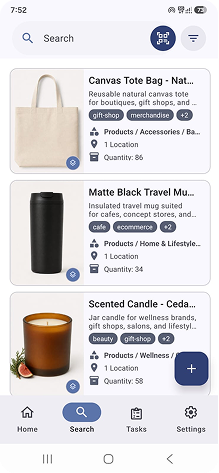
The cover is an illustration supplied by Boxymi. The mobile screenshot comes from the brand’s own assets and shows a product inventory in English; it does not document a moving trial carried out for this article.
What to check before choosing
Before adding your entire inventory, check how you will handle these tasks on your phone:
- Boxes and contents: distinguish a box from the items inside it, and change its location without losing that relationship.
- Photos: recognise an item, remember how cables were connected and document its condition before the move.
- QR labels: open the right record when you scan. Reading a retail barcode is not the same as creating a label for your box.
- Sharing: distinguish sending someone a list from letting two people update the same inventory.
- Languages and devices: check the interface language, not just the language of the app-store description.
- Total cost: include the app, subscription, labels, printing and delivery where applicable.
Keep a readable identifier on each box too, such as KIT-01. That will help you identify it even if you need to check the inventory on another device.
Compare features for organising boxes
“Sharing” means working on an inventory or exchanging data, as specified below. These options do not all provide simultaneous collaboration. On mobile, scroll the table horizontally.
| App | Boxes and photos | QR identification | Sharing | Interface languages |
|---|---|---|---|---|
| Boxymi | Records with photos and locations; labels linked to boxes or areas. | Physical Boxymi labels linked to the inventory. | Shared inventory; up to 2 members on Free. | Spanish, English, Italian, German and French on web and mobile. |
| Sortly | Folders and items with photos. | Label creation from Advanced upwards; not included in Free. | 1 user on Free; 2 on Advanced. | English, according to its help centre. |
| Nest Egg · Inventory | Categories, locations and up to 10 photos per item. | QR labels are listed as an additional purchase. | Local edition: backups and exports. Nest Egg Cloud is a separate product. | Spanish is among the listed languages. |
| MyStuff2 Pro | Containers and subcontainers; photos of items and containers. | Barcode/QR field for containers. | Syncing and sharing with other MyStuff2 Pro users. | English, according to the App Store. |
Prices and limits that affect your choice
These are the prices published when we reviewed the guide, not a guarantee of future prices. App Store amounts refer to the Spanish storefront; Sortly publishes its prices in US dollars. These euro prices are not UK or US store quotes. Check the final amount, applicable taxes and terms before paying.
| App | Published price | Relevant limit or condition |
|---|---|---|
| Boxymi | Free has no recurring fee and is activated by buying labels. Packs start at €11.50; delivery is calculated at checkout. | Up to 2 members, 1,000 items and 20 locations. Starter: €39/month per workspace, up to 5 members. |
| Sortly | Free: US$0. Advanced: US$49/month; the displayed first-year annual offer is US$288, equivalent to US$24/month. | Free: 100 unique items and 1 user. Advanced: 500 items and 2 users. The annual offer is not a month-to-month rate. |
| Nest Egg · Inventory | €7.99 initial purchase in the Spanish App Store, with additional purchases. | QR Labels (15 Pack): €1.99 in the listing. This comparison covers the local iPhone/iPad edition, not Nest Egg Cloud. |
| MyStuff2 Pro | Free download to try 15 items. The store lists Pro Features at €22.99 and Unrestricted Items at €12.99. | These are different options: removing the item limit alone does not retain all the trial’s Pro features. |
The Sortly annual promotion we checked applies to the first year of new subscriptions; renewal has different terms. For a one-off move, compare the full annual payment with the cost of the months you actually need.
Boxymi: physical labels and a shared inventory
A fit if you want to stick on a QR label and link it to a box or area. You can add photos, names and keywords, then find contents by searching or scanning. Web and mobile apps provide access to the shared inventory.
For two people organising a move, the Free plan provides up to 2 members, 1,000 items and 20 locations after a one-off label purchase. There is no recurring fee, but the labels do have a cost. If more than two people will edit the inventory, check a higher plan before starting.
What to check: how you will represent boxes and their locations within the plan limits. Do not automatically equate “1,000 items” with “1,000 locations”. The web and mobile apps support Spanish, English, Italian, German and French.
Explore Boxymi’s plans and how QR labels help organise your belongings.
Sortly: a visual inventory to keep using after the move
A fit if your move is part of a broader inventory need. Folders help organise your catalogue, and you can add photos to items and folders themselves. Plan a structure by room and box before adding all your belongings.
The practical difference is the plan: Free allows 100 unique items and one user. The plan comparison places QR label creation and access for two users in Advanced. Sortly’s help centre explains how to generate a PDF of labels for printing.
What to check: whether the record limit and subscription cost suit a one-off move. Advanced is limited to 500 items; it is not unlimited inventory. The interface is in English. If you already use Sortly for your business, using that catalogue may be more practical than duplicating it in another tool.
Nest Egg: a local inventory for iPhone and iPad
A fit if you prefer keeping a personal inventory on your Apple device. The local Nest Egg · Inventory edition lets you organise by category and location, record purchase information and store up to ten photos per item. Its listing includes Spanish among the supported languages.
The listed initial purchase is €7.99, with no subscription for this edition and additional paid features. The store lists a QR label pack as an in-app purchase. Check what it includes before assuming that the initial price covers every feature.
What to check: how you will back up the inventory and pass information to someone else. The developer distinguishes this local app from Nest Egg Cloud, which has syncing and team options. Exporting or transferring a copy of a local inventory is not the same as editing one shared list.
MyStuff2 Pro: containers and detailed records on Apple devices
A fit if you want to catalogue collections and keep using the inventory after unpacking. The developer documents containers and subcontainers, photos and a barcode or QR field. This structure can represent boxes inside other locations. It also provides syncing and data sharing with other users of the app.
It works on iPhone, iPad and Mac, with an English interface. The initial download lets you try Pro features with a maximum of 15 items. The Spanish App Store lists Pro Features at €22.99 and Unrestricted Items at €12.99 as separate options.
What to check: which upgrade you need. According to the developer, choosing unlimited items alone removes trial Pro features you have not bought. Before creating many records, set up two containers, move an item between them and check access from the other device you plan to use.
Which app fits your situation?
- You want physical labels and two people working together: consider Boxymi, checking Free plan activation and limits.
- You already have a business inventory or want to expand it later: compare Sortly with your needs during and after the move; calculate the cost of the right plan.
- You use iPhone or iPad, need Spanish and prefer a local inventory: Nest Egg · Inventory is worth trying, with a routine for backups.
- You want highly customisable records and containers on Apple devices: MyStuff2 Pro offers a flexible structure; confirm the purchases needed and whether English works for everyone involved.
There is no winner for every move. If someone will help you pack or receive boxes, check their phone, permissions and access too. An app that works only on your device may not solve the organisation of the whole move.
Try two boxes before organising the whole house
The most useful check is a small trial with your own belongings. This is a suggested exercise, not a test we conducted to score the apps.
- Prepare two boxes: KIT-01 for the kitchen and OFF-01 for the office. Attach the labels and write those identifiers visibly too.
- Record five items: use specific names, a recognisable photo and the right box. Avoid simply writing “miscellaneous”.
- Check searching and scanning: search for “laptop charger” and verify that you reach OFF-01. If you use QR labels, scan both boxes and confirm that they open the expected records.
- Simulate the move: change a box’s location to its destination room. Check that you can still find its items.
- Try collaboration: if someone else will take part, ask them to find and update a record using their own access.
- Plan a fallback: check your plan’s export or backup options and keep a list of the essential boxes.
A PRACTICAL EXAMPLE
The item, the box and the destination are different details.
“Laptop charger” identifies the item. “OFF-01” identifies the box. “New office” describes the destination. Keeping those details separate avoids renaming every item when a box changes rooms. Adapt this structure to the fields and relationships your chosen app supports.
Frequently asked questions
Can a free app handle an entire move?
That depends on the number of records, the people involved and the features you need. In this comparison, Boxymi requires a label purchase to activate Free; Sortly Free limits items and users; MyStuff2 Pro offers a 15-item trial. “Free download” does not mean the whole process costs nothing.
Do I need to label every item?
Not necessarily. For a household move, you can start by identifying boxes and recording what they contain. Add an individual label when you need to track something separately, such as equipment that changes boxes or a tool you lend to someone.
Does any QR code work with any app?
Do not assume it does. Check whether the app accepts your codes, requires its own labels and what happens when you scan them. The aim is to reach the correct record; a QR code containing only text or a web address does not guarantee that connection.
Can I use the inventory offline on moving day?
Check this in your chosen app and plan before the move. Try what you can view and which changes you can save without a connection. Keep an accessible list of priority boxes and do not rely on a feature you have not checked.
What has changed since the 2025 guide?
This edition reviews four options, distinguishes product variants and additional purchases, and separates subscription promotions from monthly pricing. You can read the previous moving-app guide as a historical reference. To choose now, use this edition’s dated information and confirm the terms before buying.